
Russian software · Registry No. 35356

Your office. Your data. Your keys.

Documents, spreadsheets and presentations with a built-in AI assistant, GOST e-signature and post-quantum protection. Data never leaves Russia — 152-FZ by design.

Download the suite Open web editor

Windows 10/11 · Windows 7/8 (compat) · Linux (deb/rpm/AppImage/RED OS) · Web

Aris Documents — Word-compatible editor with AI

Everything for working with documents — creation, e-signature, OCR, semantic search and a B2B loop with escrow. One suite, one login, zero foreign cloud dependency.

Everything for working with documents — in five applications

Documents

Word-compatible editor: DOCX 100 % round-trip, floating shapes, headers/footers, track changes, AI drafting and review.

DOCX · RTF · ODT · PDF

Spreadsheets

ArisCell: XLSX formulas (RU/EN bilingual), pivot-ready sheets, EMF/WMF metafiles, ODS headers and footers, print to fit.

XLSX · ODS · CSV

PDF

Read, annotate, sign. PKCS#7/PAdES in the browser, GOST via CryptoPro, OCR for scans and phone photos.

PDF · PAdES · OCR

Drive

Cloud storage with version history, shared folders and post-quantum encryption. Works in every editor.

50 GB · versions

Mail & ARIS ID

Mail on your own SMTP and one ARIS ID login for every service — web, desktop and mobile.

SMTP · ARIS ID

Tenders

44-FZ and 223-FZ tender matching for your business lines, cadastral checks, commercial platforms (RU product).

44-FZ · 223-FZ

Full compatibility list and comparisons: Aris vs MyOffice / LibreOffice / Google Docs.

GOST signing, 1C data and VBA macros in every application

Release feed
28 November 2026
Documents 1.3.14Spreadsheets 1.3.3Bundle 1.0.3

Blue window header in Documents, classic Word-style; base book font inheritance fixed in Spreadsheets; the Aris Office full bundle 1.0.3 installs five applications in one run with silent child setups.
28 November 2026
Linux 1.3.14

Documents 1.3.14 packages for Linux: deb, rpm, AppImage and RED OS rpm — built on the server from the same commit as the Windows release.

27 November 2026
Spreadsheets 1.3.2Slides 1.1.4

EMF/WMF metafiles and ODS headers/footers in Spreadsheets; fonts and PPTX backgrounds in Slides; the wider AI input field in every editor.

26 November 2026
Documents 1.3.12

Window controls drawn into the app header (WCO), classic R7 ribbon by default, and the missing-frame fix for Windows 11.

25 November 2026
All editors

Crash recovery after power loss (recovery) and the Knowledge Base chip (local RAG) in the AI panel; perpetual Home Plus license.

One login — the whole ARIS ecosystem

ARIS ID

One account for web, desktop and mobile. Post-quantum key exchange by default.

ARIS Drive

Cloud documents with versions and sharing, delegated encryption.

AI assistant

Russian models (GigaChat, YandexGPT) or your own on-premise LLM.

ARIS platform

Tenders, marketplace and B2B loop around your documents.

A familiar interface — no retraining

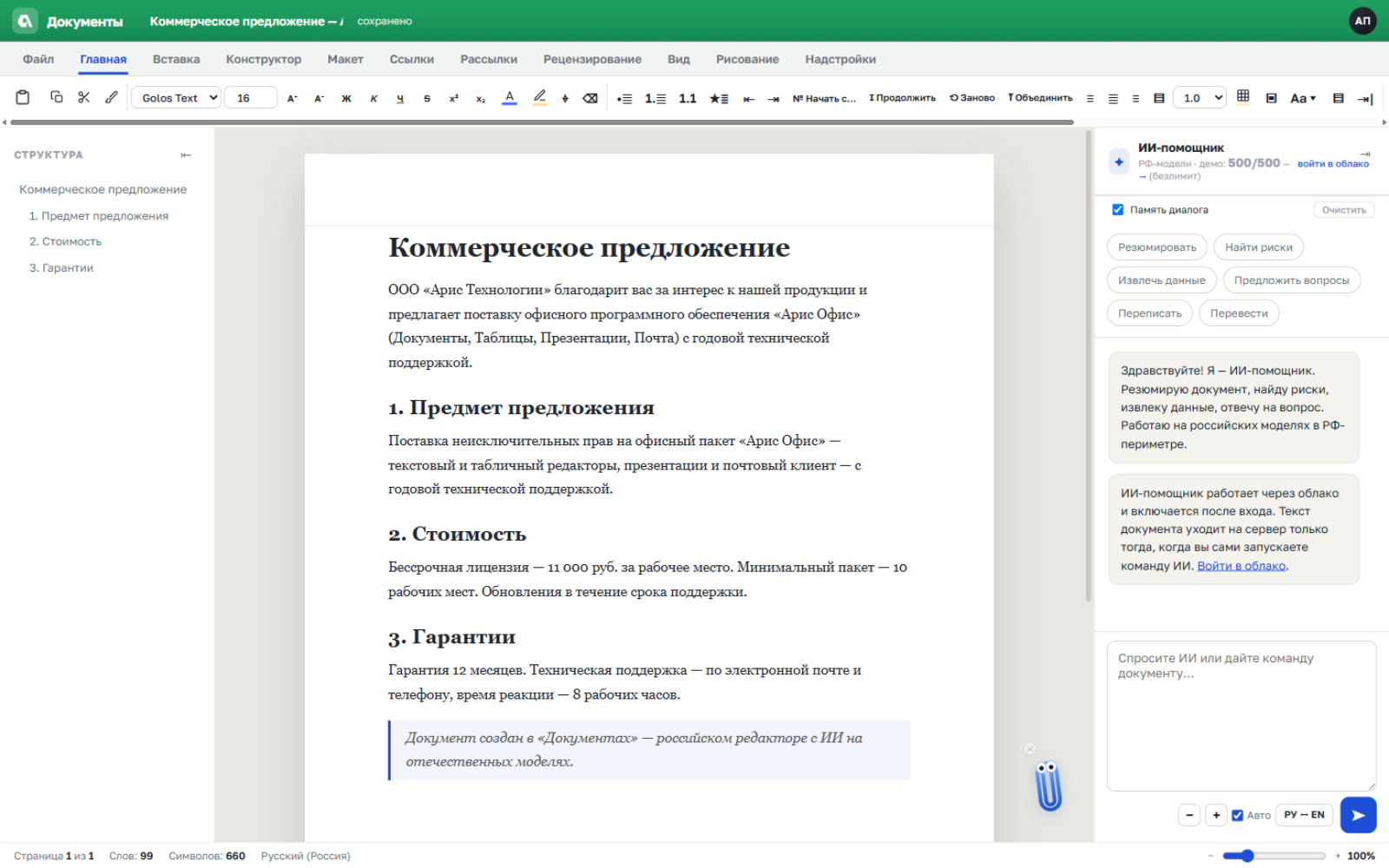
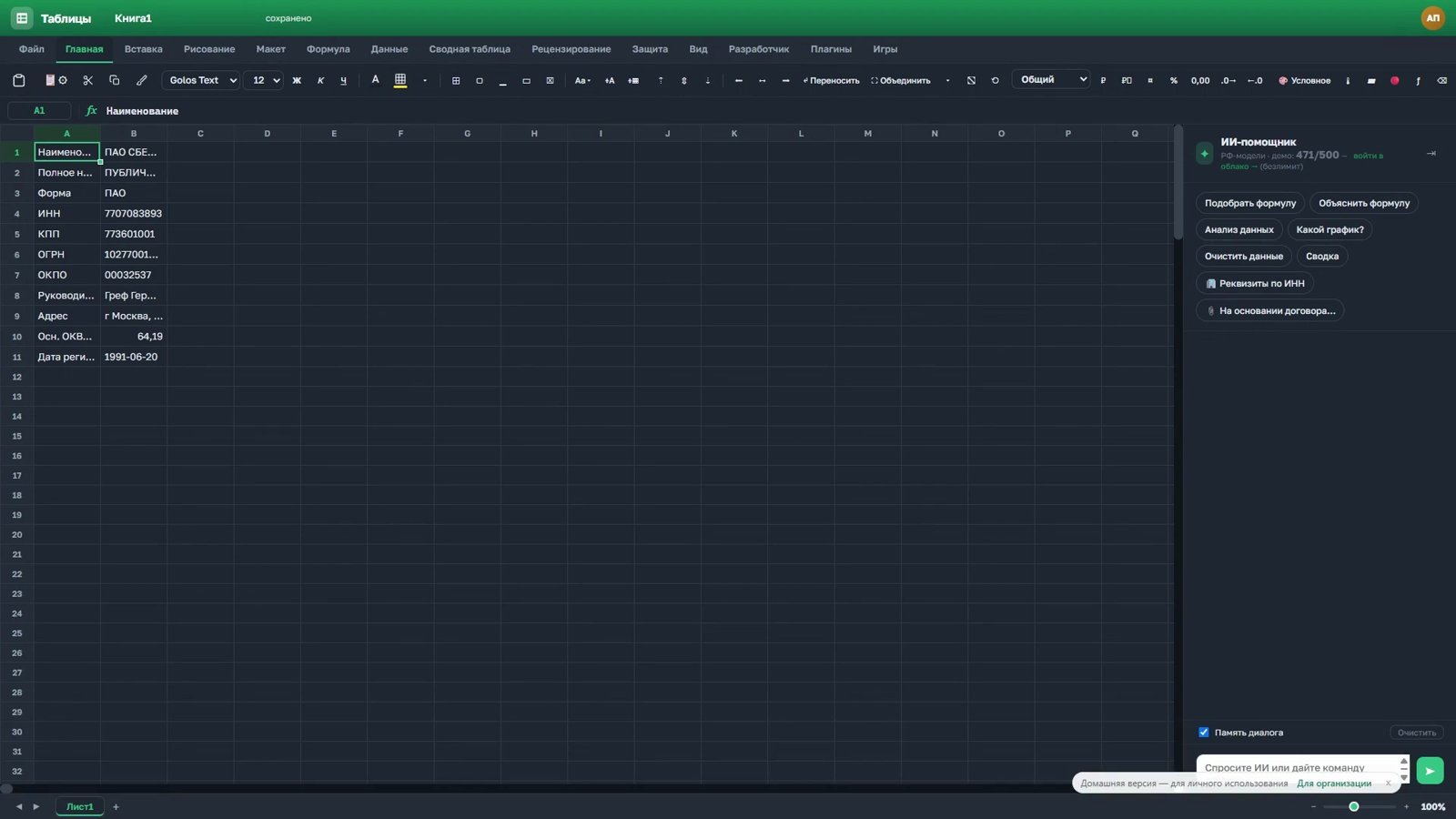
Documents — Word-compatible ribbon and editor Spreadsheets — XLSX grid with AI panel

Ribbon tabs, backstage and shortcuts follow the classic Office layout. 1011 automated compatibility tests — DOCX and XLSX open as-is.

Artificial intelligence — on your terms

Drafting & summaries

Contracts, letters and reports from a brief; page-referenced summaries of large PDFs.

Review

Risks, contradictions and blank fields located per clause, with severity levels.

Data extraction

Invoices and waybills to CSV/JSON — from scans and phone photos via OCR.

Semantic search

Find by meaning across the corpus with citations, not keywords.

Russian models only; foreign providers are blocked at the network level. On-premise LLM supported for closed loops.

Protection built for sovereign deployments

Post-quantum key exchange (ML-DSA) in ID, Drive and the desktop suite. Offline mode for air-gapped networks. LAN-based free license check, watermarking for shared editions, audit trail.

Security whitepaper

Three steps to start

1. Download

One installer for the whole suite, or each application separately — Windows, Linux or the web editor.

2. Sign in

ARIS ID — one login for everything. Free for home use, no card required.

3. Work

Open your existing DOCX/XLSX — formatting survives. AI is one keystroke away.

Works where you work

Windows 10/11 · Windows 7 SP1/8/8.1 (compat channel, Electron 22) · Linux x86-64: deb, rpm, AppImage, RED OS rpm · Web editors in any modern browser · Android (ARIS mobile).

Registry card

Registry entry

Name: Aris Office
Entry: No. 35356 of 16.09.2026
Owner: OOO Sfera (INN 7751237158)
Section 06 — office software, class 06.03
Composition: 06.11 text · 06.10 spreadsheets · 06.09 presentations
reestr.digital.gov.ru

RKN registration

Registered with Roskomnadzor as an information-system operator — encryption, audit and access control per Russian law.

Five directions for organizations

Licensing

Perpetual and subscription editions, volume keys, license cabinet for managers.

Closed loop

Own server, on-premise LLM, air-gapped installs, delegated encryption.

Integration

1C data sources, MCP tools, WebDAV, EDI — documents that talk to your systems.

Support

Direct engineer channel, SLA tiers, update policy.

Procurement

44-FZ/223-FZ ready: registry entry, GOST signing, per-seat pricing filed with tenders.

Free for home, transparent for business

Home Plus is free forever for personal use (LAN check applies). Professional — $20 per user/year; with AI — $60 per user/year. Perpetual workstation licenses from 12 990 ₽.

Pricing 30-day trial

Install the applications

One offline installer for the whole suite — or pick applications individually. The bundle runs child setup wizards silently.

Download Aris Office PDF Reader

Latest: Bundle 1.0.3 · Documents 1.3.14 · Spreadsheets 1.3.3 · Slides 1.1.4 · Mail 1.1.0 · ARIS 1.0.1

Operational documentation

Administrator and user guides, release notes, security whitepaper, tariff policy, offline deployment — maintained by the engineering team.

Documentation portal

Source code and builds

Desktop installers are built from the same git commits that ship the web editors; Linux packages are assembled on the build server from the release commit. Build logs and manifests ship with releases.

Frequently asked questions

Is it really Word-compatible?

Yes — 1011 automated DOCX/XLSX round-trip tests pass; floating shapes, styles, headers/footers and formulas survive open/save.

Does AI leave my machine?

Only to Russian model providers, and only for the request you send. On-premise LLM keeps everything local.

Can I work offline?

Fully — editors, templates and export work without network; cloud features are optional.

What does it cost?

Home Plus is free for personal use. Business editions start at $20 per user/year; perpetual seats from 12 990 ₽.

More answers: the full FAQ.

An office ready for the final result

From a draft to a signed PDF, from an invoice scan to a ledger row, from a document to a closed deal — one suite carries the whole loop.

Download now Try in the browser